
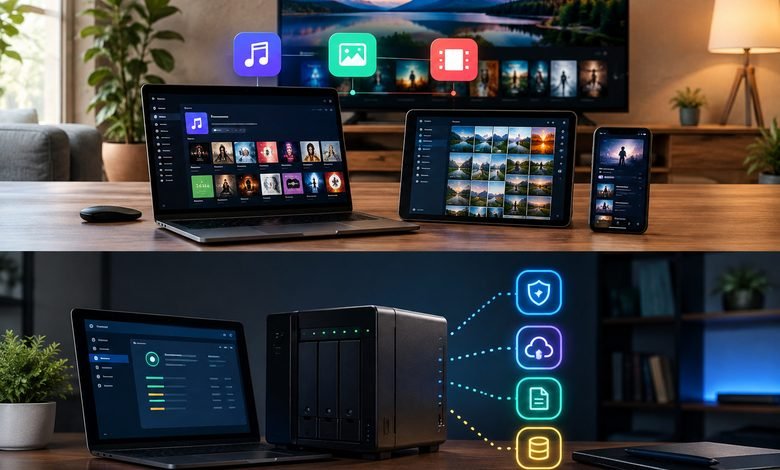
Cardinal Apps is a self-hosted media platform designed for people who want more control over their personal music, photos, movies, and TV collections. Its main system, Cardinal Media Server, brings several dedicated apps together while keeping the user’s media on their own server. The platform focuses on privacy, simple media access, and freedom from advertising. Users can host the system themselves and use specialized interfaces for different types of content.
What Is Cardinal Apps and What Does It Offer?
Cardinal Apps is an ecosystem built around self-hosted media streaming. Instead of putting a personal collection completely into a third-party service, users can run Cardinal Media Server on their own hardware or server environment. The system can then index personal media and make it available through its dedicated applications.
The main products are Cardinal Music, Cardinal Photos, and Cardinal Cinema. Each app is designed for a specific media type, while the Media Server provides the dashboard and core system needed to run them. The official platform says its self-hosted apps are free and do not require a cloud account.
How Cardinal Media Server Works
The Cardinal Media Server acts as the central part of the platform. Users install it, connect their media libraries, and allow the server to index the available content. After setup, the different Cardinal apps can use those libraries to provide a more organized streaming experience.
The official documentation includes guides for installation, deployment, accounts, indexing, jobs, updates, and role-based access control. This makes the server suitable for people who want to manage their own media environment rather than rely only on a hosted platform.
A major advantage is that the system separates the media experience into different apps. Music does not need the same interface as movies, and photographs have different browsing needs. This specialized approach can make large personal collections easier to explore.
Key Features of Cardinal Music
Cardinal Music focuses on personal music collections and provides a modern interface for discovering and playing stored audio. Instead of mixing music with movies and photos, it gives audio its own dedicated environment.
The app is useful for people who have built a large personal music library and want a cleaner way to organize and enjoy it. The platform describes Music as a way to collect, curate, and rediscover music, making the experience more focused on personal ownership than general streaming subscriptions.
Because the music is connected to the user’s Media Server, the server remains the important storage and management point. This approach can be useful for users who want their own collection available through a dedicated media application.
What Cardinal Photos Provides for Private Media
Cardinal Photos is designed for personal photographs and videos. Its main purpose is to help users archive and browse memories while keeping those files connected to their own self-hosted environment.
Privacy is an important part of this design. Cardinal presents Photos as a way to keep personal photographs away from unwanted access and under the user’s control. This can appeal to people who prefer managing their own storage instead of depending entirely on a large cloud-photo service.
The Photos application is part of the wider Media Server ecosystem, so users can manage their visual collection alongside their other personal media while still using an interface designed specifically for photographs and videos.
Cardinal Cinema Features for Movies and TV
Cardinal Cinema brings a streaming-style experience to personal movie and TV collections. It is designed to make a self-hosted library feel familiar while giving users control over the underlying media server.
Its features include watch history, collections, favorites, custom TV channels, and synchronized watching with friends. The application also includes software-based audio and video transcoding. Hardware transcoding is listed as a planned feature.
The Cinema web app is included with Cardinal Media Server. The official site lists web access for platforms such as Windows, macOS, Linux, iOS, Android, and Roku, while native apps for several of these platforms are still planned rather than currently available.
How Cardinal Apps Supports Self-Hosting and Privacy
One of the strongest reasons to consider Cardinal Apps is its self-hosting approach. Users can keep their media on their own server instead of making a third-party cloud service the main location for their collection.
The official platform states that its self-hosted apps are free forever, contain no advertisements, and do not require users to create a cloud account. Cardinal Accounts are optional and provide access to additional online services.
This model gives users a choice. Someone who wants a completely self-managed setup can focus on the self-hosted features, while someone who wants additional remote-access services can use Cardinal’s optional cloud features.
Remote Access, Accounts, and User Management
Remote access allows a self-hosted Media Server to be reached when the user is away from the home network. Cardinal currently supports several connection methods, including direct connections, relay connections, and cloud-hosted apps. Direct connections send traffic between the app and the Media Server without passing through Cardinal’s infrastructure.
The system also supports account and permission management. The documentation includes Role-Based Access Control, which can help administrators decide what different users are allowed to access. For larger personal setups or shared household servers, this provides more control over the media environment.
Cloud-hosted versions of the Music, Photos, and Cinema apps are also available as an alternative interface. The documentation explains that the media, library, and accounts remain on the user’s Media Server; the hosted app acts as the interface.
Backup, Media Indexing, and Data Protection
A self-hosted media system needs a good backup plan. Cardinal’s Secure Backups feature is designed for disaster recovery and can copy selected media away from the Media Server. Backups can help users recover after events such as disk failure, hardware loss, or accidental mistakes.
The backup system uses snapshots and can back up selected Music and Photos libraries. After the first backup, later runs can upload only new or changed files. Users can also restore a backup to another Cardinal Media Server connected to the same Cardinal Account.
This is important because self-hosting gives users more control, but it also means they need to think about storage reliability. A second copy of valuable files can provide an additional layer of protection.
Read More: epleys.com
Main Benefits of Using Cardinal Apps
The biggest benefit of Cardinal Apps is control. Users can keep their media on their own server and access it through dedicated applications. This can be especially useful for people with large personal collections who want an alternative to subscription-based media platforms.
Other benefits include no advertisements, free self-hosted apps, optional cloud accounts, specialized media interfaces, remote access, user management, and backup options. The combination creates a flexible system for people who enjoy self-hosting and want a personal media experience.
There are also practical considerations. Users need to understand basic server administration, storage, networking, and backups. Remote access can require additional network configuration, although Cardinal also provides relay and cloud-hosted options for setups where direct connections are difficult.
Who Should Use Cardinal Apps?
Cardinal Apps is a good fit for people who enjoy self-hosting and want to manage their own music, photos, movies, and TV libraries. It can also suit users who care about privacy and prefer keeping personal media under their own control.
It may be less suitable for someone who wants a completely managed streaming service with no server setup or maintenance. A self-hosted system requires some responsibility for hardware, storage, updates, network configuration, and backups.
Overall, Cardinal provides an interesting approach to personal media streaming. With Cardinal Media Server at its center and dedicated Music, Photos, and Cinema apps around it, the platform combines organization, privacy, flexibility, and control in one ecosystem. For users who want their personal media to remain their own, it offers a practical self-hosted direction.
FAQs
What is Cardinal Apps?
Cardinal Apps is a self-hosted media ecosystem for managing and streaming personal music, photos, movies, and TV through dedicated applications.
Is Cardinal Media Server free?
Yes. The official website states that the self-hosted Cardinal apps are free to use and do not require a Cardinal cloud account.
Does Cardinal Apps contain advertisements?
No. Cardinal states that its self-hosted applications do not contain advertisements.
Can I access my Cardinal Media Server remotely?
Yes. Cardinal supports remote access through direct connections, relay connections, and cloud-hosted apps, depending on the network setup.
Does Cardinal support backups?
Yes. Secure Backups can back up selected Music and Photos libraries and restore them to another compatible Media Server connected to the same Cardinal Account.